Time logging in Jira is not a favorite thing for many of us. And that is pretty reasonable. But timesheets can’t stay empty. We need that data for a variety of strategic reasons. While there are many Atlassian marketplace apps to automate the process as much as possible, and guides to make it more valuable, the conversation usually centers on finding the best path for each unique workflow. In 2026, in the age of AI, high-quality data isn’t about watching people; it’s about understanding the business. Time tracking in Jira is an irreplaceable tool for seeing how work actually flows.
The biggest threat to that data isn’t bad software. It’s a team that feels like they’re being watched. Research from the American Psychological Association shows that 56% of employees feel stressed out when they’re being monitored. To overcome that ‘Big Brother’ feeling and build a culture free from micromanagement, follow these five strategies:
Log Time Daily, Not Weekly
The biggest threat to your project planning is the recall gap. It’s driven by the Ebbinghaus Forgetting Curve, which shows that humans lose about 77% of new information within six days. If your team waits until Friday afternoon to log their hours, they aren’t recording what they did. They’re recording a best-case guess of what they think they were supposed to do.
Here is what numbers say:
Daily logs are about 67% accurate.
Weekly logs drop to 36% accuracy.
Monthly logs hit only 10%, which is essentially useless data.
Logging time daily is also a mental reset. By “closing the loop” and logging work at the end of the day, developers can actually switch off and enjoy their evening without thinking about tasks until the next day.
Focus on Burnout Prevention, Not Surveillance
Frame time tracking as a way to protect your team’s capacity. Instead of looking for who isn’t working “hard enough,” use the data to see who is doing too much.

Managers can use “Time in Status” or “Assignee Duration” reports to spot when work is piling up . If a developer has tickets totaling 20 days within a 15-day Sprint, that’s a clear warning light for burnout. Here is a guide for workload management in Jira.
When you use data as a “care instrument” rather than a tool for coercion, you build psychological safety for your team.
Standardize Your Work Categories
If your team is constantly asking “What should I log this under?”, you have a friction problem. When categories are vague, developers often pick items at random just to get the timesheet finished. This creates “dirty data” that makes it impossible to plan future projects accurately.
To fix this, everyone needs to speak the same language. While you see “coding a feature,” your finance team needs to know if that effort is building a new product (CapEx) or just keeping the lights on (OpEx). Don’t fall into the trap of assuming every “Story” is a new feature. In the real world, one ticket often involves both new code and legacy fixes. Clear categories let you classify your effort in one click without the guesswork.
Most importantly, this data helps you defend your capacity. When you can prove that 70% of your week is swallowed by maintenance and meetings, it’s much easier to justify hiring more people or re-scoping the roadmap to focus on the work that actually matters.
Embrace the “Pivot” and Honest Estimates
Humans are naturally bad at predicting the future. Nobel Prize winner Daniel Kahneman called this the “Planning Fallacy.” Our tendency to underestimate time and costs even when we know similar tasks have run late in the past.
When a task estimated at 2 hours starts taking 4, developers often feel pressured to hide the extra time to look competent. We keep trying to “honor” an outdated estimate just because we’ve already put effort into it.

Encourage your team to update the “Remaining Estimate” honestly. A “foundational truth” update is more valuable than a fake guess. It allows the whole team to realize when they need to re-scope a project before it’s too late.
Get a 360-degree View of Your Workflow
Manual and automated worklogs give you the “foundational truth” of who worked on what. This is one-half of the circle, tracking individual effort and accountability. But to get a complete, 360-degree view of your business, you need the other half: History-based analysis. This is where Timepiece – Time in Status for Jira comes in.
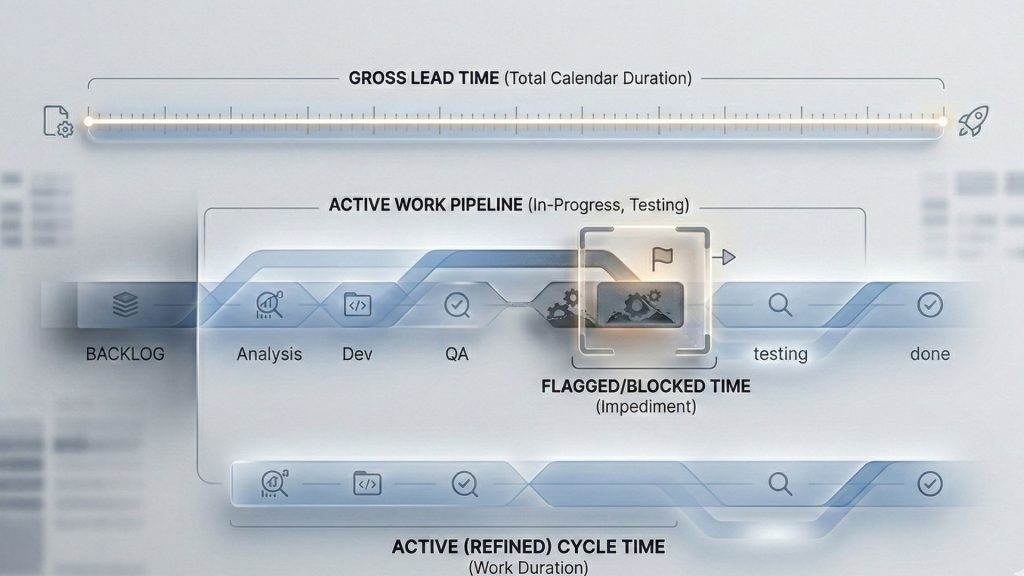
Unlike time logging in Jira, Timepiece doesn’t ask your team to log a single minute. Instead, it analyzes Jira’s own issue history to tell you how long work spent in each status, like “In Review,” “Blocked,” or “Waiting for Customer.”
How the two halves work together:
The 180° of Logging: Shows you the “effort cost.” You see exactly how many hours were spent on a task for billing, payroll, or CapEx categorization.
The 180° of History: Shows you the “process flow.” Using Timepiece, you can see if a task took 10 days because of effort or because it sat “In Review” for 9 of those days.
When you combine both, you stop blaming people for delays and start fixing the process bottlenecks that cause them.
The Bottom Line: Time is a Strategic Asset
Jira time tracking isn’t about filling out timesheets; it’s about building a predictable, transparent organization. When you treat time as a strategic asset rather than a number to be checked, you empower your team to deliver high-quality work without the burnout.
The shift from “policing” to “accounting” requires trust. Organizations that get this right build a culture where people feel supported, not surveilled. By combining honest worklogs with Timepiece, you gain the clarity needed to lead with confidence.
To learn more about Timepiece, visit its Atlassian Marketplace page. You can also see the official Timepiece documentation page or book a demo.
FAQs
What is the difference between Original Estimate and Time Spent?
The Original Estimate is your initial guess of how long a task will take before work begins. Time Spent is the actual, cumulative amount of time team members have logged against that specific issue. In a healthy culture, the goal isn’t to make these numbers match perfectly, but to use the “delta” between them to improve future planning and identify scope creep early.
How do I manually log time on a Jira ticket?
To log time natively in Jira, open an issue and click the Log work button (often found under the “More” menu or as a dedicated icon). You will need to enter the Time Spent (e.g., “2h 30m”), the date the work was performed, and a brief description of the task. This manual entry is the “effort” side of your project data, essential for individual accountability and billing.
Does Jira automatically roll up sub-task time to the Epic level?
Natively, Jira’s “Time Tracking” field on an Epic only sums work logged directly on issues linked to that Epic; it does not automatically aggregate time from sub-tasks or deeper levels of the hierarchy. To see the full 360-degree view of an Epic’s progress, you need history-based analysis. Timepiece can bridge this gap by calculating duration across all child items without requiring complex manual roll-up rules.
Can I edit or delete time that has already been logged in Jira?
Yes. If you have the “Edit Own Worklogs” permission, you can go to the Worklog section of a Jira issue, hover over your entry, and click the pencil icon to edit or the trash icon to delete it.
What is the difference between CapEx and OpEx in software development?
In Jira, CapEx (Capital Expenditures) refers to work that creates long-term value, such as new feature development or R&D. OpEx (Operating Expenses) covers day-to-day costs like bug fixes, maintenance, and administrative meetings. Standardizing these categories ensures that developers can classify their work in one step, keeping financial reporting accurate and audit-ready.
How can the Zeigarnik Effect make time tracking beneficial for developers?
The Zeigarnik Effect is the psychological tendency to fixate on unfinished tasks, which drains mental energy. Logging time daily helps “close the loop” on the day’s work. By documenting their effort at the end of the shift, developers can mentally switch off and enjoy their evenings without work-related stress lingering in their minds.
What is the Planning Fallacy in project management?
The Planning Fallacy, identified by Nobel Prize winner Daniel Kahneman, is the human tendency to underestimate the time, costs, and risks of future tasks even when past experiences contradict those estimates. In Jira, this often results in tasks running over estimates. A healthy culture encourages teams to “pivot” and update remaining estimates honestly rather than hiding delays.
Is there a way to track time in Jira without manual entry?
Yes. While manual worklogs are standard for individual accountability, you can achieve objective reporting in Jira through history-based analysis. Using Timepiece, you can automatically track how long issues spend in statuses like “In Review” or “In Progress” without asking your team to log a single minute, reducing administrative friction.