Light always travels the shortest path between two points, and never travels backward. Your Jira work items (issues) do not follow the same rules. In software delivery, “Done” can be deceptive. A work item might be marked complete, but that status doesn’t tell you how hard it was to get there. Did the work flow smoothly? Or did it bounce back and forth between developers and testers ten times?
To see how work items move, most teams track velocity. But if you aren’t tracking rework and quality issues, your velocity number is likely hiding a lot of waste. To fix this, you need to stop looking just at how long things take (duration) and start looking at how they move (transitions).
Timepiece – Time in Status for Jira covers you here, too. With Timepiece, you can identify the two biggest killers of productivity: hidden rework loops and quality issues.
Status Count Report
The first question to ask is simple: How many times did we touch this? In a perfect world, a work item moves from Analysis → Implementation → Test → Deployment. And, the Status Count for each should be just one.
But reality is rarely perfect. If Timepiece’s Status Count report shows that a work item visited Implementation 5 times, that is a major red flag.
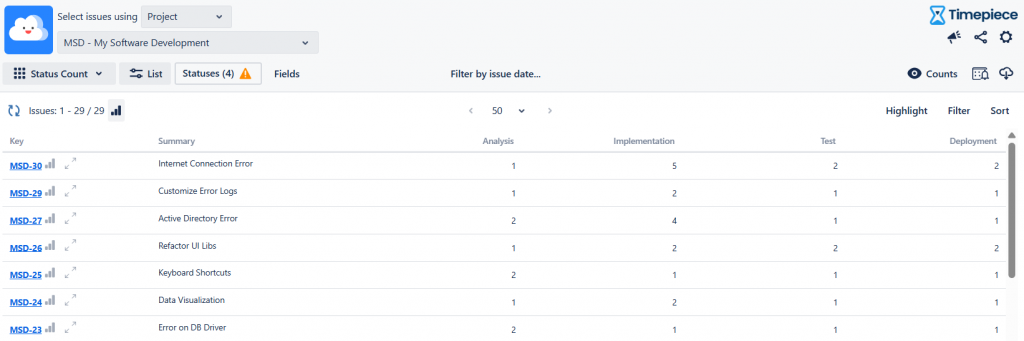
Every time a developer picks a work item back up, they pay a “context switching tax.” Why? High status counts usually mean the work was blocked, deprioritized, or rejected. And this is a productivity problem. Status Count report gives you the magnitude of the problem. To find the root cause, you need to look at the direction.
Transition Count Report
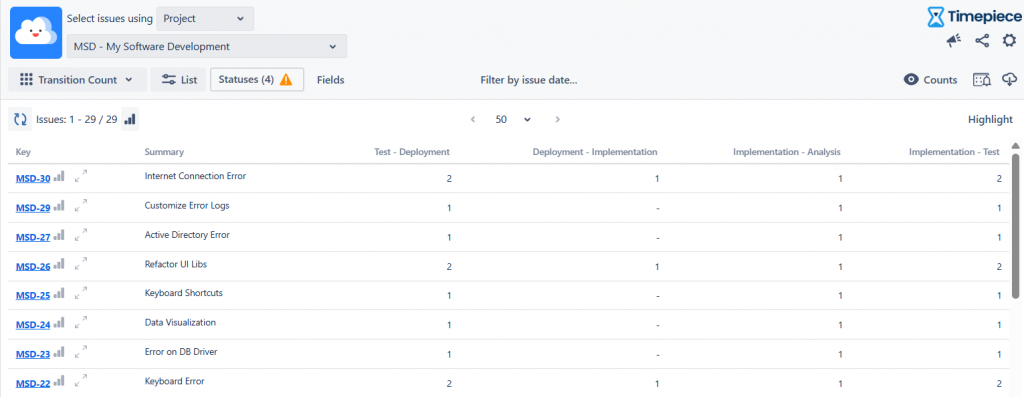
Rework isn’t always a coding problem. Sometimes it’s a planning problem. Timepiece’s Transition Count report can help you to tell the difference between “Bad Analysis” and “Buggy Code.”
To diagnose the reason, you need to look at where the work item came from.
The Definition Loop
This happens when a developer starts working, but realizes the requirements are confusing, missing, or wrong. They have to stop and send the work item back. If a work item moves backwards from Implementation to Analysis, that means the team is starting work before it is ready. To fix, the analysts or product owners need to refine the requirements better before work starts.
Execution Loop
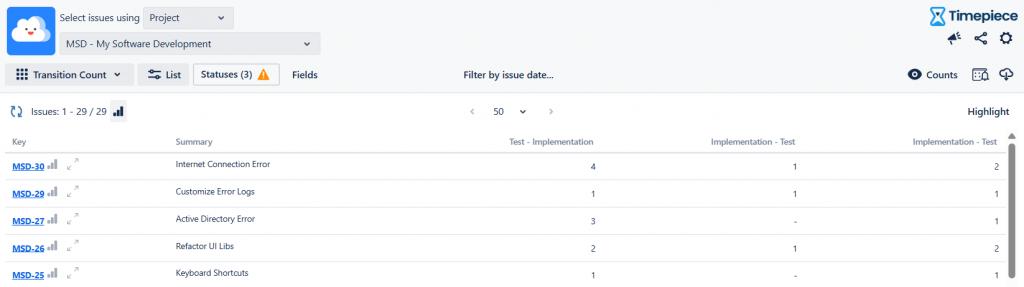
Another scenario is the Execution Loop. The requirements were fine, but the implementation failed testing. How can you spot this? Transitions from Testing to Implementation. If you see a high count here, you have a quality issue.
Analyze and Improve Your Workflow in Jira
Don’t just track how fast you are going. Track how often you are turning back.
- If work returns to Analysis, improve your requirements.
- If work returns from Test, improve your testing.
By using Status and Transition count reports, you turn hidden frustration into visible, actionable data. To learn more about Timepiece – Time in Status for Jira, visit its Atlassian Marketplace page. You can see the documentation page by clicking here, and book a demo meeting by clicking here.